
Last updated on
Oct 31, 2026

CA Master Locksmiths Lock-Out Disclaimer 2014-2026 free printable template
pdfFiller is not affiliated with any government organization

Fill out
Complete the form online in a simple drag-and-drop editor.

eSign
Add your legally binding signature or send the form for signing.

Share
Share the form via a link, letting anyone fill it out from any device.

Export
Download, print, email, or move the form to your cloud storage.
Why pdfFiller is the best tool for your documents and forms


End-to-end document management
From editing and signing to collaboration and tracking, pdfFiller has everything you need to get your documents done quickly and efficiently.
Accessible from anywhere
pdfFiller is fully cloud-based. This means you can edit, sign, and share documents from anywhere using your computer, smartphone, or tablet.
Secure and compliant
pdfFiller lets you securely manage documents following global laws like ESIGN, CCPA, and GDPR. It's also HIPAA and SOC 2 compliant.
What is CA Master Locksmiths Lock-Out Disclaimer
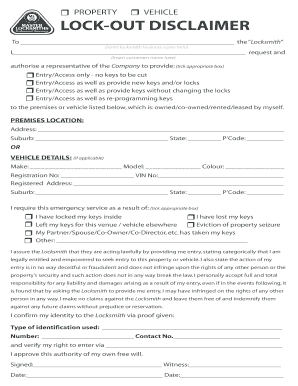
The Lock-Out Disclaimer Form is a legal document used by customers to authorize locksmiths for access to premises or vehicles during a lock-out situation.
pdfFiller scores top ratings on review platforms




I like that its user friendly.
Very easy and simple to use
love this place
Smooth app!
Smooth app! I use it all the time whenever I need to sign something on the fly.
good
good software easy to use
Saved my time and money when handling…
Saved my time and money when handling government document forms!
Who needs CA Master Locksmiths Lock-Out Disclaimer?
Explore how professionals across industries use pdfFiller.

CA Master Locksmiths Lock-Out Disclaimer is needed by:
-
Residential property owners needing locksmith services.
-
Customers facing lock-out emergencies requiring immediate assistance.
-
Locksmith professionals seeking customer authorization.
-
Real estate agents coordinating property access for clients.
-
Vehicle owners unable to access their cars or trucks.
-
Landlords needing to gain entry for repairs.
-
Witnesses validating locksmith services in legal scenarios.
Comprehensive Guide to CA Master Locksmiths Lock-Out Disclaimer
What is the Lock-Out Disclaimer Form?
The Lock-Out Disclaimer Form serves as a vital document that authorizes locksmith services for accessing a property or vehicle. This form is essential for ensuring legal entitlement, allowing the locksmith to provide necessary key services or entry. By clearly outlining the authority given to the locksmith, it safeguards the rights of both parties involved.
Understanding this form is crucial for customers who may find themselves locked out and require urgent assistance from a locksmith. The specifics of this form ensure that the locksmith acts within legal boundaries while performing their job.
Purpose and Benefits of the Lock-Out Disclaimer Form
This form is designed to protect both locksmiths and customers from potential liabilities that may arise during the service. By formalizing the agreement, it minimizes misunderstanding and establishes a clear record of authorization.
Additionally, the Lock-Out Disclaimer Form streamlines the process of gaining access, facilitating quicker resolutions for individuals locked out of their premises or vehicles. Its benefits are significant, making it an essential tool in locksmith service agreements.
Who Needs the Lock-Out Disclaimer Form?
Individuals requiring locksmith services in emergencies or non-emergency situations should utilize the Lock-Out Disclaimer Form. This includes customers who need immediate assistance and those who plan ahead for possible lockout scenarios.
The presence of a witness during the signing process enhances the form's legitimacy, ensuring both parties are accountable. This extra layer of verification is important for customer protection.
Key Features of the Lock-Out Disclaimer Form
The Lock-Out Disclaimer Form contains several important features essential for its validity and effectiveness:
-
Fillable fields for capturing relevant customer and property details.
-
An indemnity clause that protects the locksmith from liabilities associated with the service.
-
Clear instructions for completing the form accurately, ensuring compliance.
These features make the form user-friendly while serving its primary legal purposes.
How to Fill Out the Lock-Out Disclaimer Form Online (Step-by-Step)
Completing the Lock-Out Disclaimer Form online is a straightforward process. Follow these steps for accurate submission:
-
Enter essential information, including customer name and locksmith business name.
-
Detail the reason for the lockout in the designated field.
-
Utilize checkboxes for necessary consents and agreements.
-
Provide signatures where required for compliance.
These steps ensure that the form is filled out comprehensively and ready for submission.
Review and Validation Checklist for Your Lock-Out Disclaimer Form
Before submitting the Lock-Out Disclaimer Form, users should verify several key areas:
-
Ensure all required signatures are present.
-
Check the accuracy of dates and witness information.
-
Look for common errors, such as any missing fields.
Reviewing these components will help prevent submission issues and ensure the form’s integrity.
Submission Methods and Delivery of the Lock-Out Disclaimer Form
Customers have multiple options for submitting the completed Lock-Out Disclaimer Form. They can choose online methods for immediate processing or opt for in-person delivery if necessary. Regardless of the method chosen, it is crucial to keep copies of the submitted form for personal records.
These submission methods accommodate different user preferences while ensuring that the necessary documentation is securely transmitted.
Security and Data Protection for Your Lock-Out Disclaimer Form
When using pdfFiller to manage the Lock-Out Disclaimer Form, users can benefit from robust security measures. The platform employs 256-bit encryption and is compliant with important regulations such as HIPAA and GDPR.
This commitment to security assures users that their sensitive information is protected when filling out and submitting the form online.
Why Choose pdfFiller for Your Lock-Out Disclaimer Form Needs?
pdfFiller is an ideal solution for those needing to manage the Lock-Out Disclaimer Form effectively. As a cloud-based platform, it provides ease of access and versatility in document management.
Users can take advantage of features like editing, eSigning, and comprehensive document management. This makes pdfFiller a highly recommended choice for anyone looking to streamline their lock-out service agreements.
Get Started with Your Lock-Out Disclaimer Form Today!
Filling out the Lock-Out Disclaimer Form with pdfFiller is an efficient and user-friendly process. Customers can experience quick access to the service, ensuring their needs are met promptly while maintaining a secure environment for their personal information.
This platform makes it easy to complete the form online, enabling users to focus on resolving their lock-out situations swiftly and safely.
How to fill out the CA Master Locksmiths Lock-Out Disclaimer
-
1.Access the Lock-Out Disclaimer Form on pdfFiller by searching for its name in the document library.
-
2.Open the form by clicking on it, which will load the interface for editing.
-
3.Review the form instructions carefully to understand what information is required.
-
4.Gather necessary details such as property address, vehicle information, and the reason for the lock-out prior to filling out the form.
-
5.Begin filling in the required fields, ensuring to input accurate information to avoid potential issues later.
-
6.Utilize pdfFiller's fillable fields and checkboxes, allowing for an easy data entry process.
-
7.Pay attention to signature blocks, and make sure the customer and witness indicate their approval by signing using their mouse or stylus.
-
8.After completing all necessary fields, take a moment to review all entered information for accuracy.
-
9.Once satisfied, look for options to save the document, which will allow you to save your progress.
-
10.You can also download the filled form in your preferred format or submit it directly through pdfFiller's submission options.

Who is required to sign the Lock-Out Disclaimer Form?
The Lock-Out Disclaimer Form requires the customer to sign and a witness to sign. The locksmith does not need to sign the document.
Is notarization necessary for this form?
No, notarization is not required for the Lock-Out Disclaimer Form. However, it should be signed by the customer and a witness.
What information do I need to complete this form?
You will need to provide details such as the property or vehicle information, the reason for the lock-out, and your legal entitlement to access before filling out the form.
How do I submit the completed form?
After completing the form on pdfFiller, you can save it and download it or submit it electronically through the platform's submission options.
Is there a deadline for submitting this form?
While the Lock-Out Disclaimer Form does not have a specific submission deadline, it should be completed promptly to expedite locksmith services during emergencies.
What are common mistakes to avoid when completing the form?
Be sure to double-check that all required fields are filled out accurately and that signatures are present where needed. Also, ensure that the details reflect the situation correctly.
How can I ensure my locksmith is protected when using this form?
The form includes an indemnity clause that protects locksmiths from liability, but it’s essential that the form is properly filled out and signed by the customer and a witness.
Related Forms


Related Catalogs
Get the latest insights from our blog


If you believe that this page should be taken down, please follow our DMCA take down process
here
.
This form may include fields for payment information. Data entered in these fields is not covered by PCI DSS compliance.